Device Templates
A device template is a reusable blueprint for a device model: immutable model key, human-readable name, capabilities and capability definitions (JSON), default configuration, optional auto-generated device keys (serial pattern), and default MQTT ACLs. Devices you create from a template inherit these defaults so fleets stay consistent.
Create a template
-
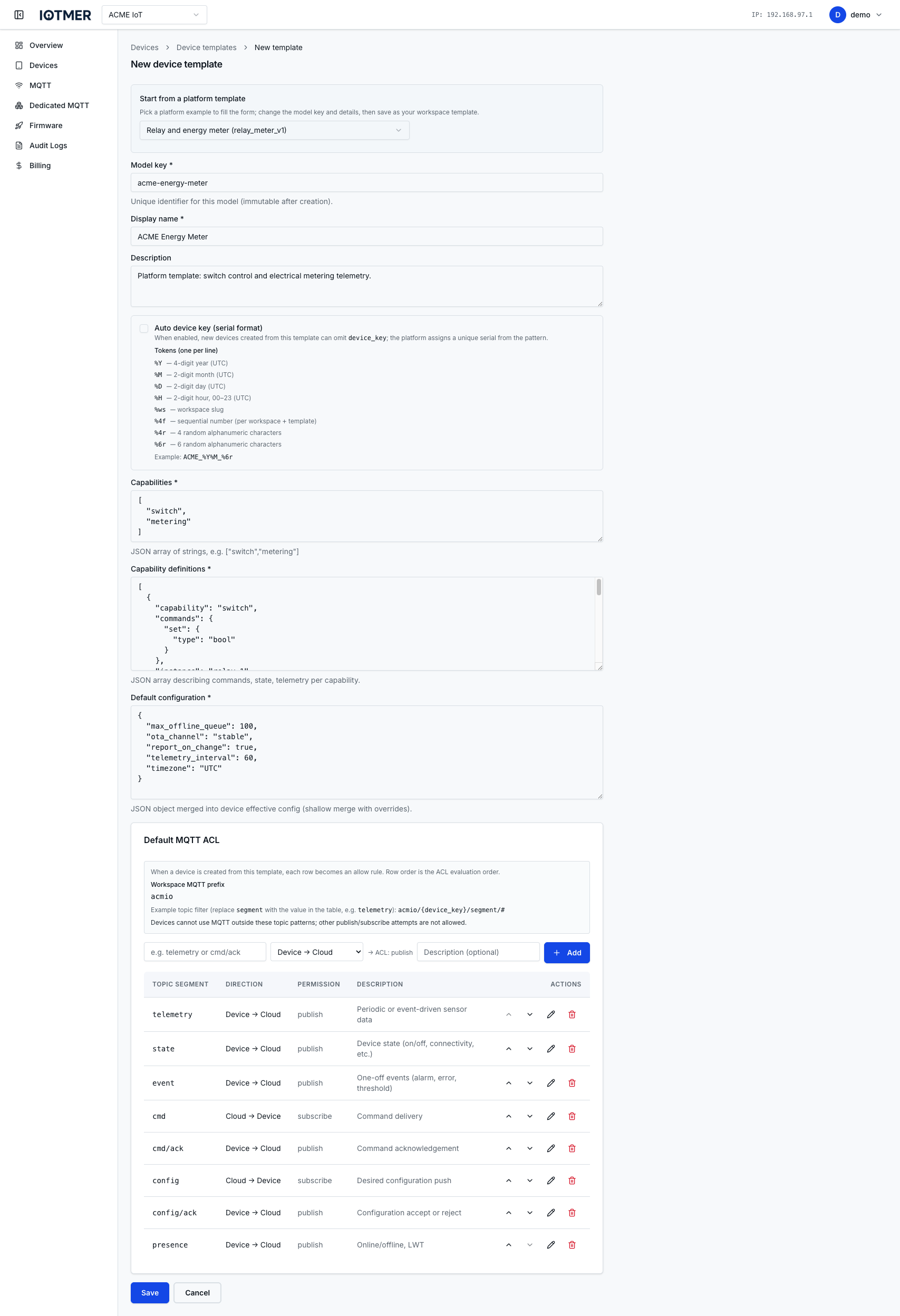
Open Devices → Device templates → New device template
-
Start from a platform template (optional): choose Empty form or an IOTMER platform example. Platform templates pre-fill the JSON sections so you can study a working pattern before saving your own model.
-
Model key (required): stable identifier for this model (for example
my_sensor_v1). This value cannot be changed after the template exists. -
Display name (required): label shown in the console (for example
My sensor). -
Description (optional): internal notes.
-
Auto device key (serial format) (optional): when enabled, new devices created from this template may omit
device_key; the platform assigns a unique serial from your pattern. Supported tokens:Token Meaning %YFour-digit year (UTC) %MTwo-digit month (UTC) %DTwo-digit day (UTC) %HTwo-digit hour, 00–23 (UTC) %wsWorkspace slug %#fSequential number (per workspace and template) %4rFour random alphanumeric characters %6rSix random alphanumeric characters Example pattern:
ACME_%Y%M_%6r. -
Capabilities (required): JSON array of capability name strings, for example
["switch", "metering"]. Default in the form is[]— replace with your model’s capability list. Tags must align with thecapabilityfield inside each definition (step 8). -
Capability definitions (required): Describe commands, state, and telemetry using the canonical
{ spec_version, capability_definitions }envelope (see Capability definitions). Product semantics always use that envelope; what the editor shows before first edit (for example an empty[]) may differ until the console default matches—follow validation when saving, or paste envelope-shaped JSON when the field accepts it. -
Default configuration (required): JSON object merged into each device’s effective configuration (shallow merge; device-level values override). Default
{}. -
Default MQTT ACL: add at least one route before saving. The console shows your workspace MQTT prefix and how filters combine with
{device_key}(for exampleyour_prefix/{device_key}/<your-segment>/#). For each row set the topic filter segment, direction (for example device → cloud or cloud → device), optional description, then Add. Until at least one route exists, the form shows a message that you cannot save. -
Click Save (or Cancel to discard).
Update a template
Saving changes to a template does not rewrite devices that were already created from it. New devices pick up the updated defaults.
PATCH /workspaces/{id}/device-templates/{template_id}
Delete a template
Deleting a template does not delete existing devices. Those devices keep their data; they only lose association with the removed template.
DELETE /workspaces/{id}/device-templates/{template_id}